KDP Tattoo Artist SketchBook Interior Guide
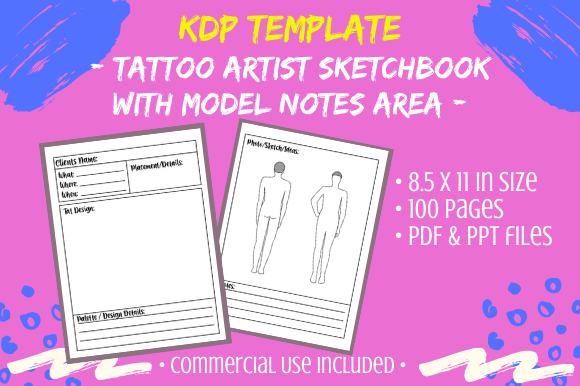
Creating a successful low-content book on Amazon requires more than just uploading a generic template; it demands a specific focus and a unique value proposition. The KDP - Tattoo Artist SketchBook Interior offers a specialized foundation for publishers targeting the body art community. This resource is not merely a blank notebook but a structured tool designed with an 8.5 x 11-inch no-bleed format, featuring mannequin outlines specifically tailored for tattoo design practice. For creators, marketers, and artists looking to expand their passive income streams or provide genuine utility to tattoo apprentices, understanding how to leverage this editable asset is the difference between a forgotten listing and a bestseller.
The inclusion of both PDF and editable PPT files transforms this from a static product into a dynamic creative engine. Because the PowerPoint file allows for direct modification, you are not locked into a single layout. This flexibility is essential for maintaining originality in a saturated marketplace. By treating this interior as a raw material rather than a finished product, you can craft a sketchbook that serves distinct niches within the tattoo industry, from traditional American styles to intricate fine-line work.
Understanding the Technical Specifications
Before diving into creative adaptations, it is vital to understand the technical parameters of this interior. The 8.5 x 11-inch size is the industry standard for sketchbooks, providing ample canvas space for detailed flash sheets and anatomical studies. The no-bleed specification simplifies the printing process and ensures that critical design elements remain safely within the margins, which is particularly important for users who may want to scan their drawings later.
The package includes 100 pages of content, excluding the cover. This page count hits a sweet spot for KDP production costs and perceived value. However, the most significant feature is the editable nature of the source files. When you receive this digital product, the immediate best practice is to duplicate the master file. Keep your original download pristine as a backup and reference point, while using the copy for all experimentation. This workflow prevents accidental corruption of the base assets and allows you to revert to the source if a design experiment fails.
Leveraging PLR and CC0 Assets Responsibly
The bundle comes filled with PLR (Private Label Rights) and CC0 (Creative Commons Zero) clip art. While these assets provide a massive head start, relying on them exclusively without modification poses a risk. Amazon’s algorithms prioritize unique customer experiences, and duplicate content can lead to suppressed listings. To mitigate this, use the included clip art as a base layer or inspiration rather than the final product. Combine these elements with your own typography, adjust opacity, create collages, or use them as background textures. The goal is to ensure that no two pages look identical to another publisher's book, even if they purchased the same template.
Creative Variations for Niche Audiences
The true power of the KDP - Tattoo Artist SketchBook Interior lies in its adaptability. A general "tattoo sketchbook" faces stiff competition, but specialized variations can capture dedicated audiences. Consider how different segments of the tattoo community utilize sketchbooks and tailor the PPT file accordingly.
- Anatomy and Placement Focus: Use the mannequin templates to create a book dedicated solely to flow and placement. Add notes about muscle groups, bone structure, and how skin stretches. This turns a simple drawing book into an educational anatomy guide for apprentices.
- Style-Specific Practice: Modify the interiors to cater to specific genres. Create a "Traditional Flash Workbook" by adding bold border guides and classic motif references, or a "Geometric Sleeve Planner" by incorporating grid overlays and stencil circles onto the mannequin pages.
- Client Consultation Journal: Rearrange the pages to function as a client intake and design log. Add sections for contact info, deposit tracking, reference photo pasting areas, and aftercare checklists alongside the sketching space. This targets working professionals rather than just students.
- Mental Health and Art Therapy: Combine the meditative aspect of tattoo art with journaling prompts. Intersperse the mannequin pages with mindfulness quotes or emotion-tracking logs, positioning the book as a therapeutic creative outlet.
Enhancing Utility Through Layout Modification
Since the PPT file is fully editable, you should actively restructure the user experience. Standard alternating blank and lined pages are functional but uninspired. Consider adding value through strategic page organization. You might group ten mannequin outline pages followed by two pages of technical graph paper for scaling designs. Alternatively, include "flash sheet" layouts with multiple smaller mannequins per page for rapid ideation, contrasted with full-page spreads for detailed rendering.
Adding instructional content can also elevate the book’s perceived value. Even brief tips on shading techniques, needle grouping theory, or color palette selection placed at the beginning of each section can transform the product from a commodity into a mentorship tool. Remember to keep text concise and relevant; the primary purpose remains sketching, so text should support, not overshadow, the creative space.
Best Practices for Originality and Compliance
To maintain a healthy KDP account and build a sustainable brand, originality must be the guiding principle. The recommendation to make this template "ALL YOUR OWN" cannot be overstated. Beyond avoiding penalties, customization builds brand loyalty. Customers return to publishers whose books consistently offer thoughtful, unique layouts rather than recycled content.
Start by changing page titles and headers. If the original template says "Sketch Page," rename it to "Design Lab," "Ink Flow," or "Concept Zone" depending on your branding. Swap out fonts to match your cover design aesthetic. Delete pages that do not serve your specific niche and replace them with custom content. If you are targeting realism tattoo artists, remove cartoonish clip art and replace it with anatomical diagrams or grayscale value scales. These small adjustments accumulate to create a distinct product identity.
Organizing Your Digital Workflow
Managing editable templates requires discipline. Establish a naming convention for your project files that includes the date and version number. This prevents confusion when you have multiple iterations of the same interior. Create a separate folder for any new assets you import, ensuring you have clear licensing documentation for everything added to the PLR/CC0 base. Keeping your workspace organized streamlines the revision process and makes it easier to update the book in the future based on customer feedback.
When testing modifications, export sample pages as high-resolution PDFs and print them physically before publishing. Screen resolution often deceives; lines that look crisp digitally may print too faintly, or grey tones may become muddy on standard KDP paper. Physical proofing ensures the mannequin outlines are light enough to draw over but visible enough to be useful, and that there is adequate margin space for binding. This practical step saves costly reprints and negative reviews regarding usability.
Strategic Positioning for Creators and Entrepreneurs
For entrepreneurs and marketers, this sketchbook interior represents a scalable asset. Once you have mastered the customization workflow, you can produce a series of related books efficiently. Each volume can target a different skill level or artistic style, creating a cohesive catalog that encourages cross-purchasing. Educators and workshop leaders can use the editable PPT to create branded course materials, turning a retail product into a teaching aid.
Freelancers and designers can also utilize this resource for client deliverables. Instead of presenting concepts on loose paper, compile ideas into a professional, branded sketchbook format using the template. This elevates the presentation of portfolio pieces or pitch decks. The versatility of the KDP - Tattoo Artist SketchBook Interior extends beyond Amazon sales; it is a foundational design system for anyone operating in the visual arts space.
Ultimately, success with this product depends on viewing it through the lens of service. Ask yourself what problem the end-user is trying to solve. Are they struggling with proportion? Do they need a place to organize client ideas? Are they looking for daily creative prompts? By aligning your edits with real-world needs and adhering to strict standards of originality, you create a product that resonates authentically with the tattoo community. The tools are provided; the distinction comes from your intentional application of them.