KDP Reading Journal Interior: Editable 6x9 Template
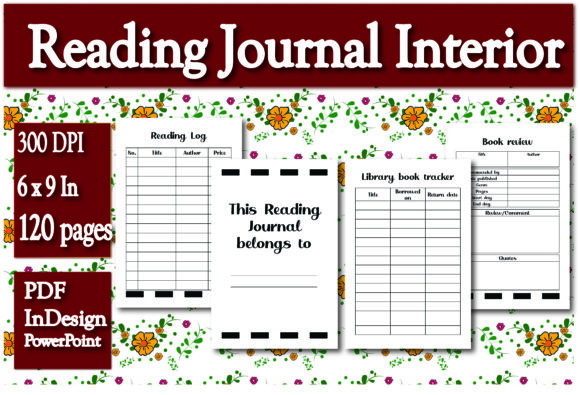
Creating a successful low-content book on Amazon KDP requires more than just uploading a generic PDF. It demands a balance of functional design, user experience, and technical precision. This KDP Reading Journal Interior provides that foundation, offering a professionally structured 120-page layout in the industry-standard 6 x 9 inch trim size. Unlike static templates that lock you into a single design choice, this resource includes both Adobe InDesign and PowerPoint source files alongside a print-ready PDF. This flexibility allows creators, educators, and publishers to adapt the interior to specific niches without starting from scratch.
The true value of this template lies in its editability. Whether you are a designer comfortable with professional typesetting software or an entrepreneur who prefers the accessibility of presentation tools, you have full control over the final product. The pre-formatted sections for reading logs, library tracking, and book reviews are designed to be intuitive for the end-user while remaining technically compliant with KDP’s printing specifications. This eliminates the guesswork regarding margins, bleed, and gutter safety zones, allowing you to focus entirely on branding and market positioning.
Strategic Customization for Niche Markets
A common mistake in the KDP space is publishing identical interiors across multiple listings. To stand out, you must tailor the content to a specific audience. Because this pack includes editable source files, you can transform a general reading journal into a specialized tool. For example, if you are targeting academic researchers or graduate students, you might rename the "Book Review" section to "Literature Notes" and add fields for citation formats or methodology tags. Conversely, for a fiction-focused book club demographic, you could expand the review section to include discussion questions or character analysis prompts.
Educators and homeschoolers represent another high-value segment. Using the PowerPoint file, you can easily adjust the reading log to track minutes read rather than pages, aligning with summer reading programs or literacy goals. You might also add a simple progress bar or achievement tracker at the bottom of each page. These small modifications, made possible by the included source files, significantly increase the perceived value of the book for a specific buyer. The goal is to solve a distinct problem rather than providing a vague solution that appeals to everyone but satisfies no one.
Optimizing the Core Functional Elements
The template includes four essential components that form the backbone of any effective reading tracker. Understanding how to leverage these elements ensures your final product remains useful and organized.
- Ownership Page: The “This Reading Journal belongs to” page serves as both a personalization feature and a practical loss-prevention tool. Consider adding a subtle watermark or a dedicated space for a contact email/QR code to make it more functional for commuters or travelers.
- Reading Log: Tracking title, author, and price provides data beyond simple completion dates. The price field is particularly useful for budget-conscious readers or those tracking their return on investment for educational materials. Ensure the column widths allow for long titles without cramping the handwriting space.
- Library Book Tracker: Borrowed books require different tracking than owned books. The borrowed-on and return-date fields help users avoid late fees. This section can be repurposed as a "To-Read List" or "Wishlist" if your target audience primarily purchases rather than borrows books.
- Book Review Section: A structured review area encourages deeper engagement. Rather than blank lines, consider keeping the existing prompts or modifying them to include star ratings, favorite quotes, or emotional impact scales. Structure prevents writer's block and makes the journal feel like a guided experience.
Technical Workflow: From File to Print
Having access to both InDesign and PowerPoint files streamlines production regardless of your skill level. Professional designers will appreciate the clean layer structure and master pages in the InDesign file, which allow for global changes to fonts, headers, and footers in seconds. If you need to adjust the gutter margin because you plan to use a thicker paper stock, the master page setup ensures consistency across all 120 pages without manual realignment.
For creators who do not own Creative Cloud subscriptions, the PowerPoint file is a powerful alternative. It maintains the correct 6 x 9 dimensions and safe zones, acting as a visual editor for text and layout. When working in PowerPoint, always verify that your slide size matches the trim size exactly before making edits. Exporting as a high-resolution PDF is critical; ensure you select "High Quality Print" or "Press Quality" settings to maintain crisp lines and legible text. Blurry interiors are the fastest way to receive negative reviews, so never compromise on export resolution.
If you prefer a hands-off approach or need to launch immediately, the included print-ready PDF is formatted to KDP standards. However, even when using the ready-made version, consider creating a unique cover that complements the interior’s aesthetic. The cohesion between exterior branding and interior functionality signals quality to potential buyers browsing search results.
Expanding Beyond Amazon KDP
While optimized for KDP, this interior has applications far beyond self-publishing. Freelancers and virtual assistants can use the editable files to create branded client gifts or corporate wellness resources. A marketing agency might customize the journal with company branding and distribute it to employees as part of a professional development initiative. The ability to modify the "Belongs To" page to include a company logo or department name transforms a commodity product into a bespoke organizational tool.
Blogger and influencers can utilize this template to create digital downloads or printable versions for their communities. By adjusting the color profile to RGB and removing bleed margins, the same source files can serve as a digital planner for iPad users. This multi-format approach maximizes the ROI of a single asset. You are not just buying a book interior; you are acquiring a versatile layout system that adapts to print, digital, and corporate contexts.
Maintaining Design Integrity and Usability
When customizing this KDP Reading Journal Interior, restraint is often more effective than excess. The 6 x 9 trim size offers limited real estate, and overcrowding the page reduces usability. Maintain ample white space around writing areas to accommodate different handwriting sizes. Test your modifications by printing a sample page at actual size before finalizing the manuscript. What looks spacious on a screen may feel claustrophobic on paper.
Consistency in typography and alignment creates a professional feel. Stick to two complementary typefaces maximum—one for headers and one for body text or labels. Ensure that line weights for tables and borders remain uniform throughout the document. Jagged lines or varying stroke weights distract from the content and suggest amateur production. The provided templates are balanced for readability; treat them as a grid system rather than a suggestion box.
Finally, consider the user journey. A reading journal is a daily companion, not a reference book. Navigation should be effortless. If you add new sections or trackers, ensure they are logically placed. Group similar activities together so the user isn't flipping back and forth unnecessarily. The most successful journals are those that reduce friction in the habit-tracking process. By combining the technical readiness of this template with thoughtful, audience-specific customization, you create a product that serves a genuine purpose and stands the test of repeated use.