KDP Interior - Album Review Log: Customizable Templates for Music Journaling and Publishing
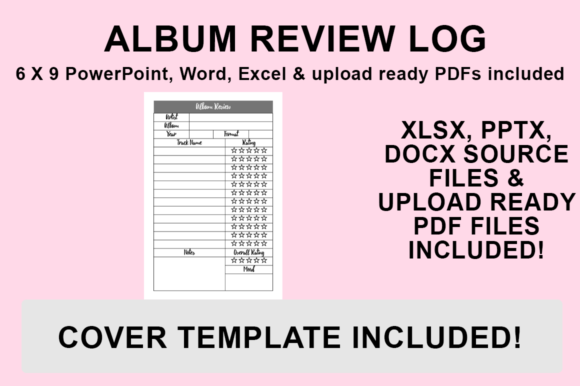
For music enthusiasts, critics, and content creators, keeping track of listening habits is about more than just memory; it is about cultivating a deeper relationship with sound. The KDP Interior - Album Review Log provides a structured yet flexible foundation for documenting musical journeys. Unlike generic notebooks, this resource offers editable source files in PowerPoint, Word, and Excel, alongside a print-ready PDF. This versatility allows users to tailor the interior to their specific reviewing style before publishing on Amazon KDP or printing for personal use. Whether you are building a commercial low-content book brand or creating a bespoke journal for your own library, having control over the layout ensures the final product serves its intended purpose effectively.
Why Editable Source Files Matter for Reviewers
Most KDP interiors are static PDFs that force users to accept whatever layout the designer created. While convenient, this rigidity often fails to accommodate the nuances of different music genres or reviewing styles. A metalhead tracking technical instrumentation needs different fields than a pop critic focusing on lyrical themes and production trends. By providing PowerPoint, Word, and Excel source files, this Album Review Log template shifts the power back to the user.
In Microsoft Word, you can easily adjust text boxes, change fonts to match your branding, or add introductory pages explaining your rating system. Excel is particularly powerful for users who want to create data-driven logs, allowing for automated calculations of average ratings or sortable columns for genre and release year. PowerPoint offers the most visual freedom, enabling creators to drag and drop graphic elements, resize review sections, and integrate custom artwork without needing advanced design software. This adaptability transforms a simple log into a personalized tool that reflects the unique voice of the reviewer or publisher.
Real-World Applications Across Different Niches
The utility of a customizable album review log extends far beyond casual hobbyists. Understanding where and why different demographics use these templates reveals their true value in both personal and professional contexts.
Music Bloggers and Content Creators: For writers running music blogs or YouTube channels, consistency is key to audience retention. Using a standardized template ensures every review covers essential criteria, making content easier to produce and compare over time. A blogger might customize the Excel version to track release dates and label information, streamlining the research process for weekly roundups. When they eventually compile their reviews into a book, the pre-formatted KDP interior ensures a professional look that builds authority with readers.
Educators and Music Students: In academic settings, active listening is a skill that requires documentation. Music theory students or history educators can modify the Word template to include specific prompts related to coursework, such as harmonic analysis or historical context notes. Instead of buying expensive textbooks, a professor could customize this log to serve as a semester-long workbook, sizing it to 6″x9″ for portability during lectures or field trips. The ability to edit means the log evolves with the curriculum rather than becoming obsolete.
Vinyl Collectors and Archivists: Physical media collectors often struggle to catalog their acquisitions meaningfully. A standard spreadsheet lacks the tactile satisfaction of writing by hand, but a blank notebook lacks structure. This KDP Interior bridges that gap. Collectors can add sections for pressing details, condition notes, and purchase prices. By uploading a customized PDF to KDP, they can print exact copies of their cataloging system whenever they acquire new batches of records, maintaining a uniform archive that adds value to their collection.
Aspiring KDP Publishers: For entrepreneurs in the low-content book space, differentiation is the primary challenge. Uploading a generic music journal leads to poor sales because it blends in with thousands of identical products. Access to source files allows publishers to niche down significantly. You could create a "Jazz Vinyl Review Log" with specific terminology, or a "Podcast Listener’s Journal" by simply renaming headers and adjusting graphics. This level of customization targets specific long-tail keywords and audiences, turning a generic template into a viable business asset.
Technical Considerations Before Customizing
Before diving into the design process, users should understand the technical parameters to avoid frustration later. All included files are designed with no bleed and sized specifically for 6″x9″. This trim size is the industry standard for journals and logs, offering a balance between portability and writing space. Maintaining this size is crucial if you plan to use the print-ready PDF immediately. However, if you intend to resize the document for a different format like 8.5″x11″, you must adjust margins and safe zones within the source files to prevent content from being trimmed during printing.
Font selection also plays a critical role in usability. While it is tempting to use decorative typefaces for headers, ensure the body text remains legible at small sizes. Since many users will be handwriting in the printed log, line spacing and box height matter more than aesthetic flair. Test your customizations by printing a single page at home before finalizing the PDF. This step helps verify that there is enough physical space for actual handwriting, which digital screens often misrepresent.
How to Export Your Customized File for KDP
Once you have tailored the Album Review Log to your needs, generating a high-quality PDF is the final step. Proper export settings ensure that your fonts embed correctly and dimensions remain accurate. Follow this streamlined workflow to prepare your file:
- Open your desired source file (PowerPoint, Word, or Excel) and finalize all changes, including font choices, formatting adjustments, and additional graphics.
- Navigate to the ‘File’ menu and select ‘Save As’ to open the export dialog.
- Choose your destination folder to keep your project organized.
- From the ‘Save as type’ dropdown menu, strictly select PDF (.pdf). Do not choose PDF/A or other variations unless specifically required, as standard PDF preserves layout fidelity best for KDP.
- Click Save. Open the resulting PDF to double-check margins and page count before uploading to the KDP dashboard.
This process works identically across Microsoft Office applications, ensuring a consistent output regardless of which program you used for customization. Remember that KDP requires PDFs to have embedded fonts; saving directly from Office typically handles this automatically, but verifying the file prevents rejection during the review process.
Making an Informed Choice
Selecting the right template involves honest assessment of your technical comfort level and end goals. If you lack experience with Microsoft Office or prefer a plug-and-play solution, the included print-ready PDF is sufficient for immediate use. However, the real value proposition lies in the source files. Users should consider whether they have the time and willingness to customize the interior. Editing requires attention to detail regarding margins, alignment, and typography.
Additionally, think about the longevity of the project. If you plan to update the log annually or create a series, starting with editable files saves immense time in the future. You can create a master template once and simply update the year or volume number for subsequent editions. Conversely, if this is a one-off gift or a temporary project, the unedited PDF may be the more practical choice. Ultimately, the KDP Interior - Album Review Log is a toolkit rather than a finished product. Its effectiveness depends entirely on how thoughtfully you adapt it to fit the specific rhythm of your musical life or business strategy.