Evaluating KDP Interior - Makeup Chart Templates for Self-Publishing
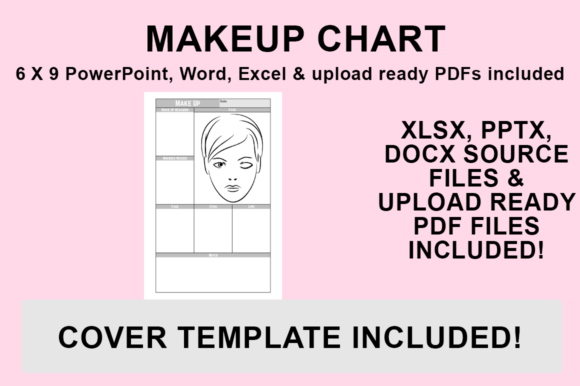
For self-publishers and content creators in the beauty niche, producing high-quality low-content books requires a balance of aesthetic appeal and technical precision. The KDP Interior - Makeup Chart is a specialized template resource designed to streamline the creation of makeup tracking logs, beauty journals, and cosmetic reference guides. Unlike generic notebook interiors, this resource provides structured layouts specifically tailored for recording product details, application techniques, and color palettes. Understanding the capabilities and limitations of these editable templates is essential for publishers looking to create distinct products on Amazon KDP without investing in expensive professional design software.
Understanding the Template Ecosystem
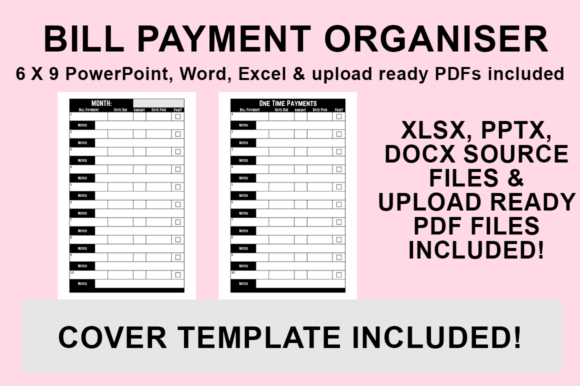
The core value proposition of this KDP Interior - Makeup Chart lies in its multi-format accessibility. Rather than providing a static PDF that limits creative input, the package includes source files in Microsoft PowerPoint, Word, and Excel. This approach targets users who possess basic office software skills but lack proficiency in Adobe InDesign or Affinity Publisher. The inclusion of an upload-ready PDF serves as a baseline option, allowing for immediate publishing if customization is not required. However, the primary utility comes from the ability to modify the source files to match a specific brand identity or niche requirement.
These templates are pre-configured to 6″x9″ with no bleed settings. This specific trim size is one of the most popular formats for portable beauty journals and handbag-sized reference charts. The "no bleed" configuration simplifies the printing process and reduces the risk of formatting errors during the KDP upload review. For publishers evaluating this resource, it is important to recognize that this format prioritizes safety and ease of use over full-page edge-to-edge graphics. This makes it particularly suitable for text-heavy charts, tables, and framed layouts where margins are necessary for readability and binding clearance.
Strategic Benefits of Editable Source Files
The decision to utilize editable templates rather than hiring a designer or starting from scratch involves several practical tradeoffs. The most significant benefit is the reduction in production time. Creating a consistent grid system for makeup charts that aligns perfectly across 100+ pages can be tedious and prone to error. These templates provide a mathematically correct foundation, ensuring that lines, tables, and text boxes remain uniform throughout the document.
Furthermore, the ability to customize fonts and styling addresses a critical challenge in the low-content book market: saturation. Many KDP interiors look identical because publishers use unmodified stock assets. By leveraging the PowerPoint or Word files, creators can implement unique typography, adjust column widths for specific data points (such as ingredient lists vs. price tracking), and integrate proprietary branding elements. This level of customization helps differentiate a product in search results and can justify a higher price point compared to generic alternatives.
Excel integration offers a distinct advantage for data-centric makeup charts. If the interior involves complex inventory tracking, shade matching matrices, or expiration date logging, Excel allows for formula-based organization before exporting to PDF. This ensures data integrity and alignment that is difficult to achieve manually in word processing software.
Technical Considerations and Workflow
Potential users must evaluate their technical comfort level with Microsoft Office applications in the context of print design. While these programs are familiar, they behave differently than dedicated layout software. When customizing the KDP Interior - Makeup Chart, users should adhere to a specific export workflow to maintain print quality:
- Customization Phase: Open the desired source file to modify fonts, formatting, and graphics. Ensure all added elements respect the safe zone margins inherent in the no-bleed design.
- Export Initiation: Navigate to ‘File’ and select ‘Save As’ rather than ‘Export’ to access specific format options.
- Destination Selection: Choose a local folder to ensure file integrity during the save process.
- Format Specification: Select PDF (.pdf) from the ‘Save as type’ dropdown. This embeds fonts and locks dimensions to the required 6″x9″ specification.
- Finalization: Click Save to generate the upload-ready file.
This native PDF generation method is generally reliable for KDP standards. However, users should always verify the output using the KDP Previewer tool, as Office applications sometimes handle transparency and color profiles differently than professional design tools.
Evaluating Fit: When to Use vs. When to Seek Alternatives
Determining whether this template solution aligns with specific publishing goals requires an honest assessment of project scope and design requirements. This resource is a strong fit for publishers creating functional beauty journals, student cosmetology workbooks, or personal makeup diaries where structure and clarity take precedence over artistic illustration. It is also ideal for those testing new niches; the low barrier to entry allows for rapid prototyping of multiple variations to gauge market response without significant upfront investment.
Conversely, there are scenarios where alternative solutions may be more appropriate. Publishers aiming for a luxury, high-art aesthetic with full-bleed photography or complex vector illustrations may find the constraints of Word and PowerPoint limiting. These applications are not optimized for heavy image processing or CMYK color management, which can lead to suboptimal print results for image-heavy books. Additionally, creators planning to produce books in trim sizes other than 6″x9″ will need to manually resize every element, potentially negating the time-saving benefits of the template. In such cases, learning Canva, Affinity Publisher, or hiring a freelancer might yield better long-term ROI.
Decision-Making Insights for Publishers
When comparing this KDP Interior - Makeup Chart against competitors or free resources, consider the total cost of ownership beyond the purchase price. Free templates often come with restrictive licenses or poor formatting that requires hours of correction. Paid, editable templates like this one transfer ownership of the final design to the user, eliminating ongoing royalty concerns and licensing ambiguities. The inclusion of three distinct file formats also acts as an insurance policy; if one application corrupts a file or fails to export correctly, backups are available in other ecosystems.
Ultimately, the suitability of this product depends on the publisher's definition of efficiency. For those who view Microsoft Office as their primary design environment, this template bridges the gap between amateur documents and professional KDP interiors. It removes the technical friction of margin calculation and grid setup, allowing creators to focus on content relevance and user experience. However, success still requires effort. Simply uploading the base PDF without modification is unlikely to result in sustainable sales in a competitive category. The true value is unlocked only when the user leverages the editable nature of the files to create a product that offers genuine utility and distinct visual identity to the end reader.
Publishers should also consider the scalability of this asset. Once the master template is customized and branded, it can serve as a foundation for an entire series of beauty-related books. Consistent interior styling builds brand recognition among readers, encouraging repeat purchases. Therefore, the evaluation should not be based solely on a single book project, but on the potential to establish a cohesive catalog within the beauty and wellness niche. By weighing the convenience of pre-set dimensions against the necessity for unique customization, creators can make an informed decision that supports both their current production needs and their long-term publishing strategy.