Evaluating the KDP Daily Planner Template: Specifications, Formats, and Strategic Fit
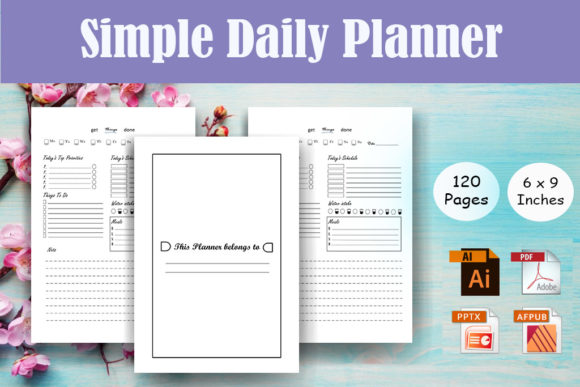
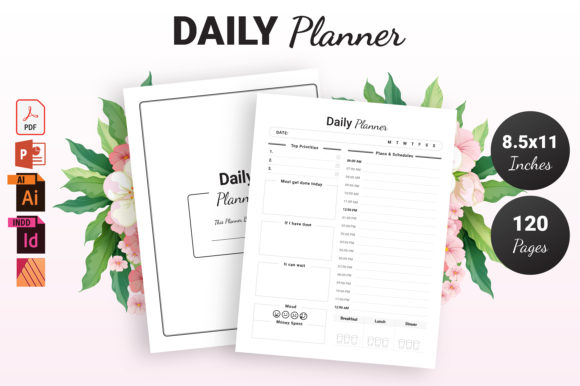
For self-publishers and digital product creators, selecting the right interior template is often more critical than designing a cover. The market for low-content and medium-content books on Amazon KDP has matured significantly, shifting away from generic lined notebooks toward functional tools that solve specific organizational problems. A dedicated KDP Daily Planner template serves as a foundational asset in this space, but not all templates offer the same utility or flexibility. When evaluating a resource that includes PDF, PowerPoint, Illustrator, and InDesign formats with specific 8.5″ x 11″ dimensions and 120 pages, it is necessary to understand how these technical specifications translate into commercial viability and production efficiency.
This analysis explores the practical application of a multi-format KDP Daily Planner, comparing it against alternative creation methods and helping you determine if this specific configuration aligns with your publishing goals. Rather than viewing this as a simple download, consider it as a production framework that requires strategic evaluation regarding customization capabilities, print readiness, and long-term brand building.
Technical Specifications and Print Readiness
The primary value proposition of any KDP template lies in its adherence to Amazon’s printing standards. This specific KDP Daily Planner is configured at 8.5″ x 11″ inches with 120 pages and no bleed. Understanding why these parameters matter is essential for avoiding rejection during the upload process and ensuring a professional final product.
The Significance of No Bleed Configuration
A "no bleed" setting means that all design elements, text, and graphics must remain within a safe margin, typically 0.375 inches from the trim edge on all sides. Unlike full-bleed planners where color extends to the paper's edge, no-bleed interiors are generally safer for beginners and faster to approve. However, this imposes strict design constraints. When using the provided PDF or source files, you must verify that no critical content sits too close to the gutter or outer edge. The advantage here is consistency; because the margins are pre-set, the risk of content being trimmed off during the binding process is minimized compared to custom-sized bleed layouts.
Page Count Considerations
At 120 pages, this planner offers approximately four months of daily tracking or a full year of weekly planning with additional note sections. This page count strikes a balance between perceived value and spine width. Books under 100 pages often have spines too thin for legible text, while those exceeding 200 pages can become unwieldy for daily carry. For a daily planner, 120 pages suggests a quarterly focus or a condensed annual format. Publishers should evaluate whether their target audience prefers comprehensive annual planners or modular quarterly systems before committing to this length.
Comparing File Formats: Flexibility vs. Convenience
One distinct feature of this KDP Daily Planner package is the inclusion of four distinct file types: PDF, PPTX, AI, and INDD. Most competitors offer only one or two formats. Evaluating which format to use depends entirely on your technical proficiency and customization needs.
- Print-Ready PDF: This is the baseline requirement for KDP. If you intend to publish the planner exactly as designed without modification, the high-quality PDF is sufficient. It ensures font embedding and image resolution are locked. However, PDFs are notoriously difficult to edit structurally. Use this only if the existing layout perfectly matches your niche requirements.
- PowerPoint (PPTX): This format lowers the barrier to entry for creators unfamiliar with professional design software. PPTX allows for easy text replacement, color adjustments, and slide reordering. While less precise than vector-based tools, it enables rapid prototyping and localization. The tradeoff is potential formatting shifts when converting back to PDF, requiring careful pre-flight checks.
- Adobe Illustrator (AI): Ideal for creators who need to modify vector graphics, icons, or structural lines. AI provides granular control over every element. If you plan to rebrand the planner with unique illustrations or adjust the grid system significantly, this is the superior choice. It maintains scalability without quality loss, which is crucial for crisp printing.
- Adobe InDesign (INDD): The industry standard for multi-page layout. INDD is best suited for global changes across 120 pages, such as adjusting master page margins, changing paragraph styles, or automating page numbering. If you intend to create a series of planners or update the interior annually, InDesign offers the most efficient workflow despite its steeper learning curve.
Strategic Comparison: Templates vs. Custom Design
When researching KDP Daily Planner options, creators typically choose between purchasing a pre-made template like this one, hiring a freelancer, or designing from scratch. Each approach carries distinct opportunity costs and benefits.
Pre-Made Templates vs. Freelance Design
Hiring a designer guarantees uniqueness but introduces higher upfront costs and longer revision cycles. A template provides immediate access to a tested structure at a fraction of the cost. The limitation is exclusivity; other publishers may use the same base layout. To mitigate this, the availability of editable source files (AI/INDD) is critical. If you purchase this KDP Daily Planner but only use the static PDF, you compete directly with others using the identical file. Utilizing the source files to alter fonts, headers, and section arrangements transforms a commodity asset into a differentiated product.
Templates vs. DIY Creation
Designing from scratch offers total originality but requires significant time investment and technical knowledge of KDP specifications. Errors in margin calculation or DPI settings can lead to repeated rejections. This template acts as a verified scaffold, eliminating technical guesswork. For publishers testing a new niche, the template reduces risk. If the niche proves unprofitable, the sunk cost is minimal compared to weeks of custom design work. Conversely, if you have a highly specific methodology (e.g., a proprietary productivity system), a generic daily planner structure may require so much modification that starting from scratch becomes more efficient.
Best-Fit Scenarios and Limitations
No single resource suits every publisher. Based on the specifications and format variety, this KDP Daily Planner is best evaluated against specific user profiles and business stages.
When This Resource Is the Right Choice
- Niche Validation: You want to test demand for a specific demographic (e.g., teachers, nurses, students) without investing in custom design. The editable formats allow quick adaptation of terminology and branding to fit the sub-niche.
- Series Expansion: You already have successful journals or notebooks and need a complementary daily planner to increase average order value. The consistent 8.5x11 size ensures shelf uniformity.
- Skill Bridging: You are proficient in content strategy but lack advanced layout skills. The PPTX and INDD files provide a learning ground to understand professional pagination while maintaining creative control.
- Seasonal Updates: You publish undated planners that require minor annual refreshes. Source files make updating copyright years, holiday references, or motivational quotes efficient.
When to Seek Alternatives
- Complex Binding Requirements: If your audience demands spiral binding or hardcover lay-flat designs, standard KDP paperback specifications may not suffice. This template is optimized for standard perfect binding.
- Highly Visual Content: If your planner relies heavily on full-color photography or complex watercolor backgrounds, a no-bleed black-and-white interior template will be restrictive. You would need a full-bleed color template instead.
- Digital-First Products: While PDFs can be used digitally, this template is engineered for print. Hyperlinks, interactive forms, and RGB color spaces required for iPad/tablet planners are not the primary focus here.
Evaluating Long-Term Value and Customization Depth
The decision to acquire this KDP Daily Planner should factor in long-term usability beyond a single upload. The inclusion of multiple source formats suggests a focus on adaptability, which is a key differentiator in a saturated market. Publishers should assess whether the underlying structure supports their broader catalog strategy.
Consider the modularity of the 120-page layout. Can sections be removed or duplicated easily in InDesign? Does the PowerPoint master slide system allow for global branding changes? These technical attributes determine whether the template is a disposable asset or a sustainable production tool. Furthermore, evaluate the license terms associated with the download. Ensure that customization rights align with your commercial intentions, particularly if you plan to distribute modified versions outside of KDP or bundle them with coaching services.
Ultimately, the effectiveness of this KDP Daily Planner depends on how actively you engage with the provided source files. Passive users who upload the default PDF face high competition and low differentiation. Active users who leverage the AI and INDD files to create a unique user experience transform a standardized specification into a proprietary product. By weighing the technical constraints of the 8.5x11 no-bleed format against your specific niche requirements and editing capabilities, you can make an informed decision that balances production efficiency with market distinctiveness.